


Understanding how to make a degree symbol is a small but essential digital skill that plays a surprisingly important role in everyday communication. Whether you are typing temperatures, angles in mathematics, geographic coordinates, or scientific data, the degree symbol (°) ensures accuracy, clarity, and professionalism. Yet many users struggle to locate or create this simple symbol across different devices and platforms.
From keyboards and word processors to smartphones and Chromebooks, the method for inserting a degree symbol varies widely. This often leads to confusion, formatting errors, or incorrect substitutions such as using a lowercase “o,” which can undermine credibility in academic, professional, and technical contexts.
This comprehensive guide draws on real-world experience, software documentation, and usability best practices to explain how to make a degree symbol efficiently on every major device. Each method is explained clearly, with practical insights to help you remember and apply it quickly. Whether you’re a student, teacher, professional, or casual user, this article provides reliable solutions you can trust.
What Is a Degree Symbol and Why It Matters
The degree symbol is a typographical character used to denote degrees of arc, temperature units, and geographic positioning. Though visually small, it carries significant meaning.
Definition and Usage Explained
• The degree symbol represents measurement units in temperature scales like Celsius and Fahrenheit.
• It is used in mathematics and geometry to express angles accurately.
• Scientific writing relies on the symbol to maintain standard notation.
• Geographic coordinates use degrees to indicate latitude and longitude.
• Professional documents require proper symbols for credibility.
• Using incorrect substitutes can lead to misinterpretation.
Correct usage of the degree symbol improves clarity, reduces ambiguity, and aligns your content with international formatting standards.
Also Read:- How to Start Knitting for Beginners: Easy Step-by-Step Learning Guide
How to Make a Degree Symbol on Keyboard (Windows and Standard Keyboards)

This is one of the most commonly searched methods because standard keyboards do not display the degree symbol directly.
Definition and Context
On Windows and standard external keyboards, the degree symbol is accessed through specific key combinations rather than a dedicated key. These shortcuts rely on character encoding systems built into operating systems.
Keyboard Shortcut Methods Explained
• The Alt code method uses numeric keypads to generate special characters.
• Holding the Alt key and typing 0176 creates the degree symbol instantly.
• This method works reliably across most Windows applications.
• Numeric keypad functionality must be enabled for accuracy.
• Laptop users may need to activate embedded number keys.
• Memorizing the shortcut saves time during frequent use.
This approach is especially valuable for professionals working with data, weather reports, or technical documentation.
Also Read:- How to Make a Bag Out of Wrapping Paper: A Complete Step-by-Step DIY Guide
How to Make a Degree Symbol on Chromebook

Chromebooks operate differently from Windows and Mac systems, which often confuses new users.
Chromebook-Specific Explanation
Chromebooks rely on Chrome OS shortcuts and Unicode input rather than traditional Alt codes. Understanding this system simplifies character insertion.
Chromebook Degree Symbol Methods
• Using Ctrl + Shift + U activates Unicode input mode.
• Typing 00B0 followed by Enter inserts the degree symbol.
• The symbol can also be copied from Character Map tools.
• Chrome extensions provide quick-access symbol libraries.
• Touchscreen Chromebooks allow symbol selection via on-screen keyboard.
• Bookmarking frequently used symbols improves workflow efficiency.
These methods ensure compatibility across Google Docs, Sheets, and web-based platforms.
Also Read:- How to Lower Body Fat Percentage: A Complete Science-Backed Guide
How to Make a Degree Symbol in Word (Microsoft Word)
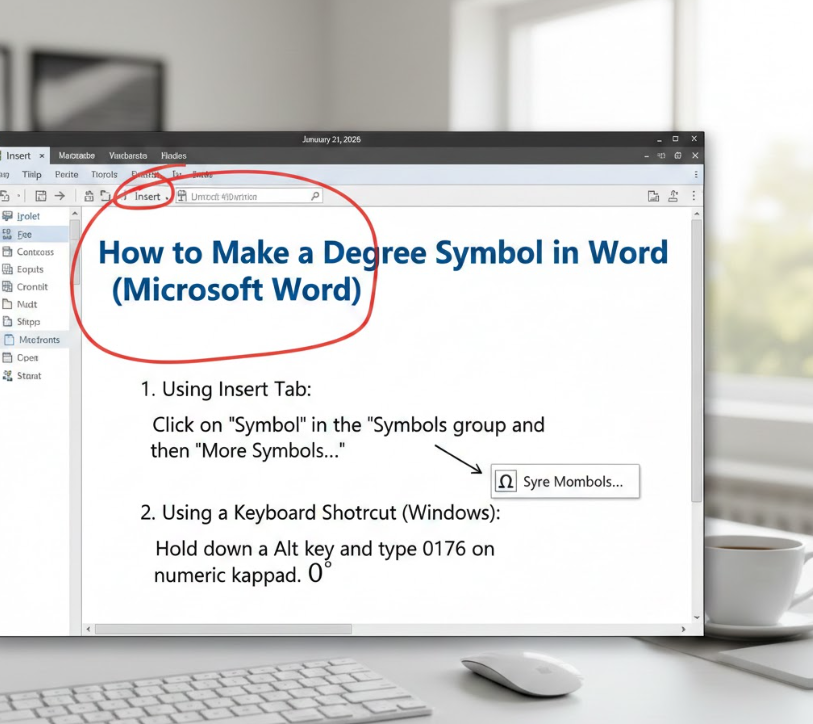
Microsoft Word offers multiple built-in methods for inserting special characters.
Word Processing Context
Word is widely used for academic papers, reports, and professional documents, making correct symbol insertion essential.
Word Degree Symbol Techniques
• Insert Symbol feature allows manual selection from character sets.
• Keyboard shortcuts work seamlessly inside Word.
• AutoCorrect can replace custom text with the degree symbol.
• Unicode input supports precise formatting.
• Copy-paste maintains formatting consistency.
• Templates can store frequently used symbols.
These options provide flexibility depending on your workflow and document complexity.
Also Read:- How to Pick a Lock: A Complete, Safe, and Ethical Guide for Beginners and Learners
How to Make a Degree Symbol on Mac (macOS)
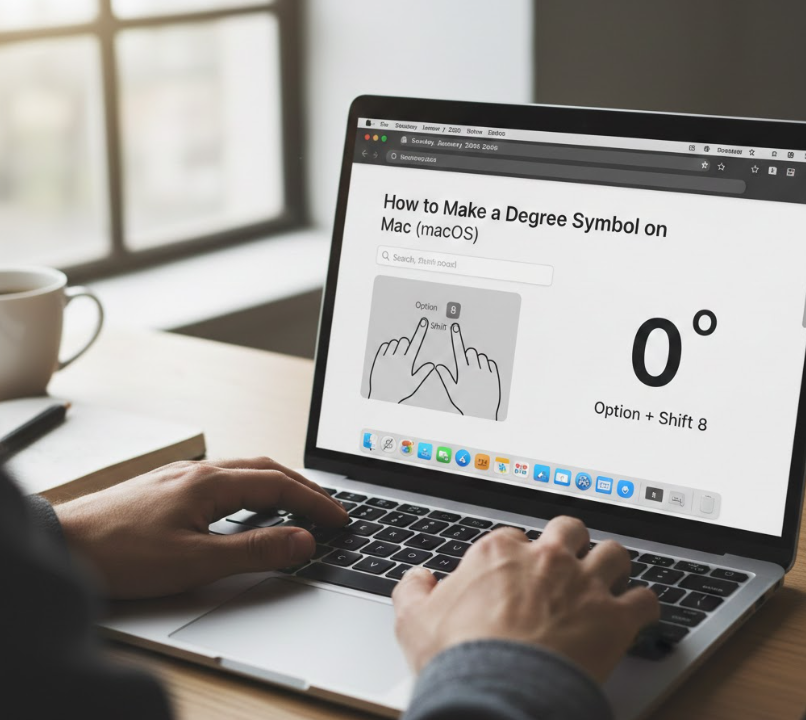
Mac users benefit from intuitive shortcuts designed for creative and professional tasks.
macOS Input System Explained
macOS uses a combination of modifier keys and character viewers to access special symbols quickly.
Mac Degree Symbol Methods
• Pressing Option + Shift + 8 instantly inserts the degree symbol.
• Character Viewer displays all symbols visually.
• Emoji & Symbols menu allows quick searching.
• Text replacement settings automate frequent use.
• Works across Pages, Word, and browsers.
• Shortcut consistency improves muscle memory.
Mac’s approach is widely regarded as one of the most user-friendly systems.
Also Read:- How to Increase Ferritin Levels: A Complete, Evidence-Based Guide
How to Make a Degree Symbol on iPhone (iOS Devices)
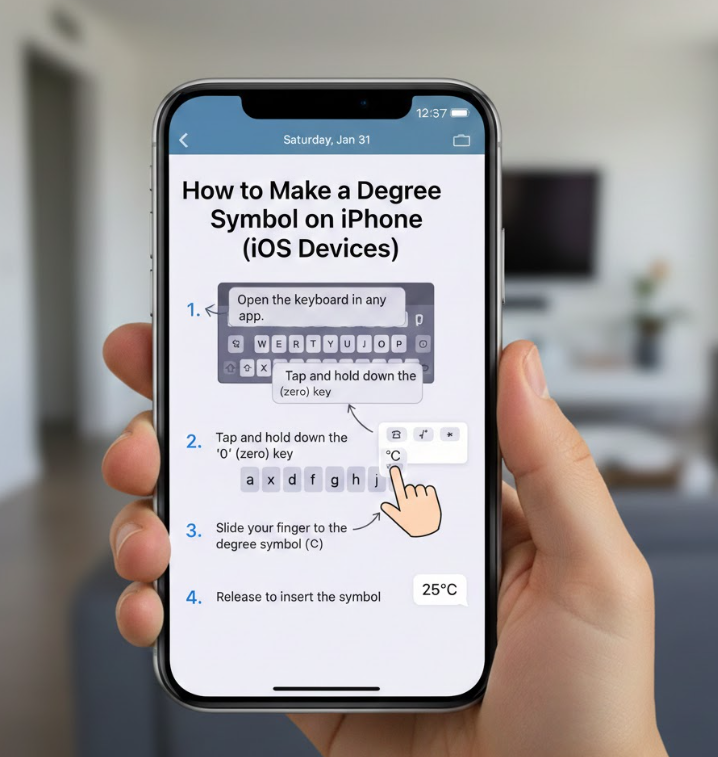
Mobile users often need the degree symbol for weather, messaging, or academic purposes.
Mobile Typing Context
iOS hides special characters behind long-press functions, prioritizing clean keyboard layouts.
iPhone Degree Symbol Steps
• Switch to numeric keyboard by tapping “123.”
• Press and hold the zero (0) key.
• Slide finger to select the degree symbol.
• Release to insert it instantly.
• Works across all iOS apps.
• Predictive text may suggest the symbol automatically.
This intuitive method is quick once learned and works consistently across Apple devices.
Also Read:- How to Cook Plantains: A Complete, Step-by-Step Expert Guide
Common Mistakes When Making a Degree Symbol
Many users unknowingly substitute incorrect characters.
Errors and Their Impact
• Using lowercase “o” instead of ° causes formatting errors.
• Inconsistent symbols reduce professional credibility.
• Copy-paste from unreliable sources may introduce encoding issues.
• Font incompatibility can distort symbols.
• Auto-formatting may remove special characters.
• Incorrect spacing affects readability.
Avoiding these mistakes ensures clarity and accuracy.
Best Practices for Using Degree Symbols Professionally
Correct insertion is only part of proper usage.
Formatting and Style Guidelines
• Always place the degree symbol immediately after the number.
• Maintain consistent font usage.
• Follow style guides like APA or ISO standards.
• Use non-breaking spaces when required.
• Avoid redundant unit repetition.
• Proofread technical documents carefully.
Also Read:- How to Clean a Pizza Stone Properly: The Complete Expert Guide
Conclusion: Mastering How to Make a Degree Symbol Anywhere
Knowing how to make a degree symbol is a small skill with big benefits. It improves accuracy, professionalism, and clarity across academic, technical, and everyday writing. By mastering device-specific shortcuts and best practices, you eliminate guesswork and save time.
Whether you are typing on a keyboard, Chromebook, Mac, Word document, or iPhone, the methods in this guide ensure you can insert the degree symbol confidently and correctly every time.
FAQs
Can I copy and paste the degree symbol?
Yes, but shortcuts are faster and more reliable.
Does the degree symbol work in all fonts?
Most standard fonts support it, but always preview documents.
Is the degree symbol different for temperature and angles?
No, the same symbol is used universally.
For More Updates Visit: Biomagazine
